 Nullvorm
Work / Case study
Pi Crust
A desktop workspace for an AI coding agent, with a design layer that holds the build up against Figma.
- Role
- Pim Dieks: design and code, solo
- Year
- 2026
- Runs on
- macOS and Windows 11
- Status
- v0.1.0, in use by my design team
- Source
- GitHub

The problem
Coding agents write a lot of front-end code now, and they work from text: a prompt, a file, a diff. The design lives somewhere else. It is in a Figma frame, in a set of tokens, in how a card looks at 390 pixels wide in dark mode. None of that is in the agent's view, so the checking is left to the designer.
For me that meant Figma in one window, the dev build in a browser, the agent in a terminal, and a lot of typing. I described in words what was a few pixels off, the agent guessed what I meant, and I checked again. The loop was slow, and vague requests got vague fixes.
I wanted one window with the repo, the running app and the agent side by side, where what I see on screen goes to the agent as something exact: this element, this token, this value.
Key decisions
-
2.1Wrap the agent, don't replace it
Pi Crust has no agent of its own. It runs Pi, the coding agent I already used in the terminal, as a subprocess: one process per chat tab, so several chats can work at once. The model, subagents, skills, extensions and MCP servers I set up for Pi keep working as they do in the terminal, and the two share their permission modes.
The app adds a surface to the agent. It doesn't ask me to configure, trust or learn a second one.
-
2.2Measure with code, not with the model
Whether a build matches its design is a measurement, so plain code takes it. The compare view puts the Figma frame next to a capture of the build at the same size: as a slider, an onion skin, side by side, or a pixel diff with a match score and a threshold. The viewports are real captures at 390, 820 and 1440 pixels wide, in light and dark.
The agent never decides whether something looks right. It gets the measurement, and so do I.
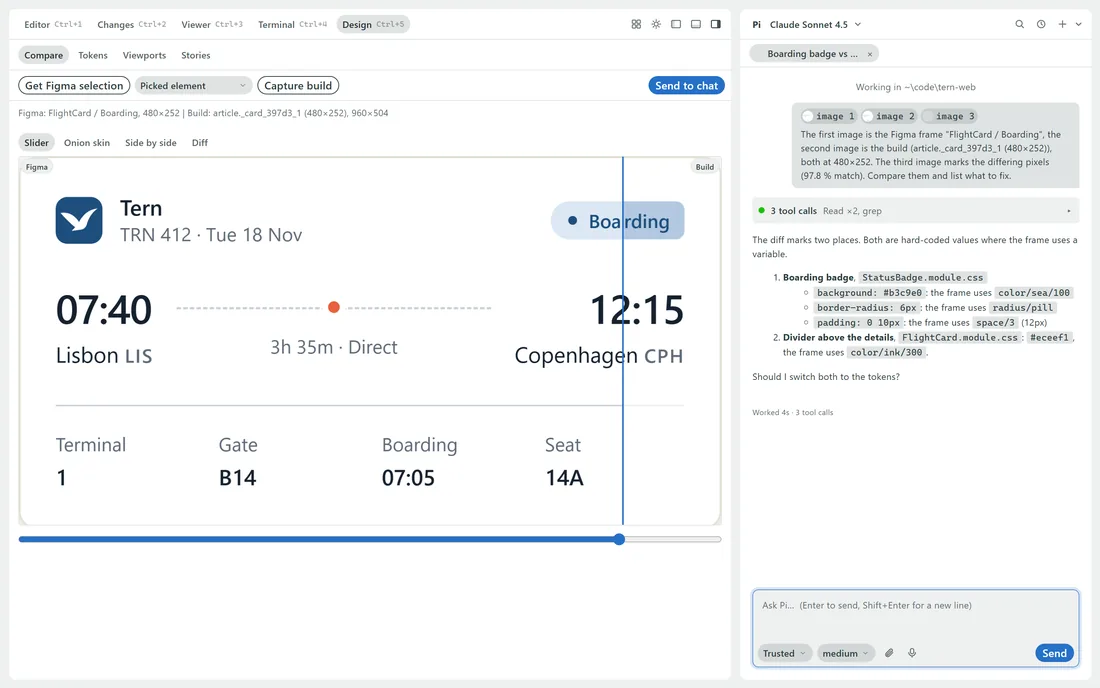
Compare in Slider mode: drag the line to see the Figma frame on one side and the build on the other. Here the line runs through the Boarding badge, so one half is the design (a lighter pill) and the other the build (a darker badge with square corners). Diff mode, one click away, marks the differing pixels (97.8% match here). -
2.3Make tokens the shared language
A design system already has a vocabulary, so the app speaks it. When I pick an element on the page, every value is marked as a theme token or hard-coded, and a hard-coded value comes with the nearest token and how far off it is. The Tokens view lines up the tokens in the code with the variables in Figma: the same, different, only in code, only in Figma.
The Tweak panel's sliders snap to the page's tokens; holding Alt gives a free value. So a request to the agent doesn't say "a bit tighter". It says which property moves from which value to which token.
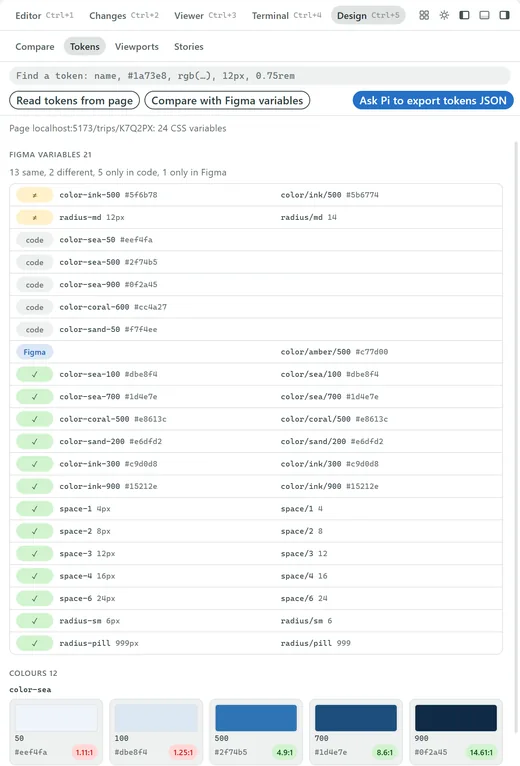
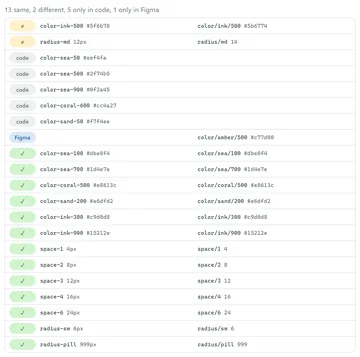
Tokens: the code against the Figma variables, with contrast for every colour. 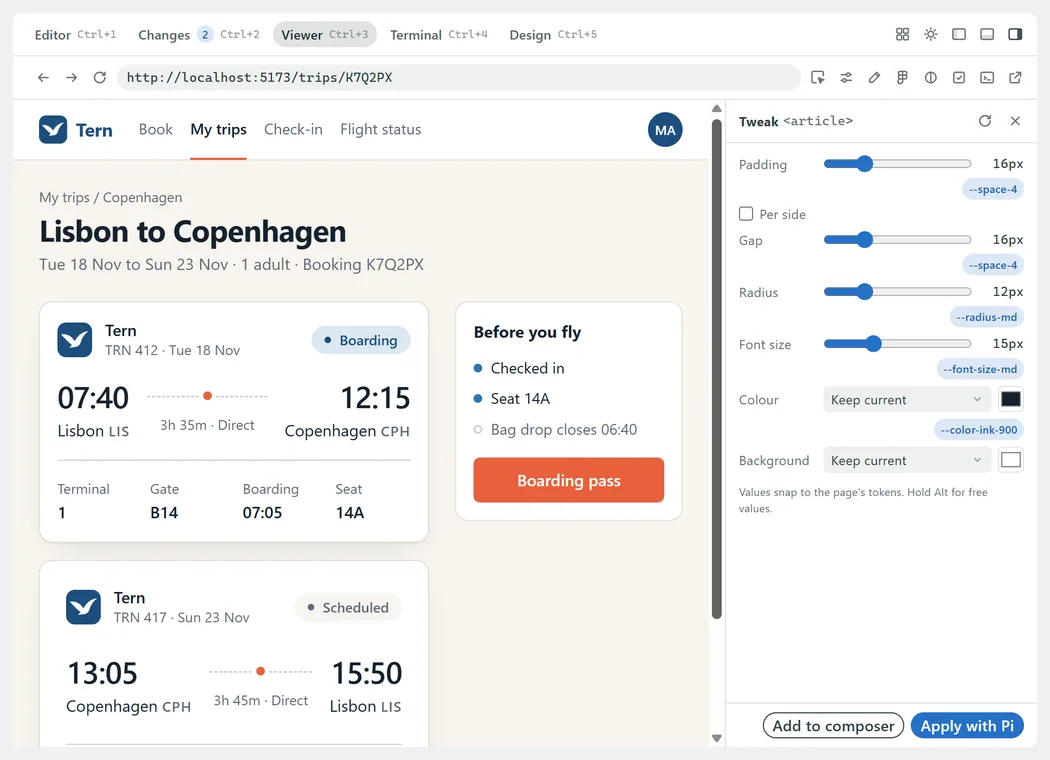
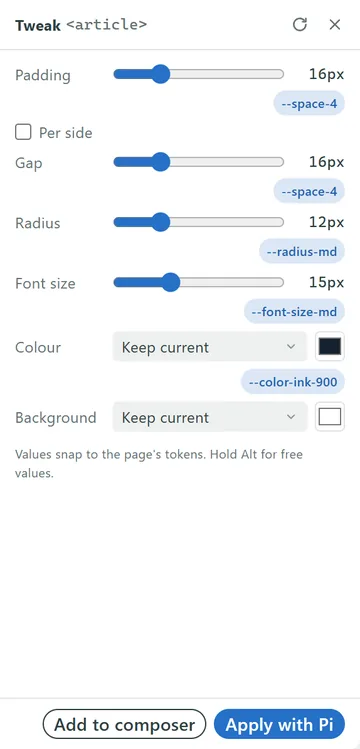
Tweak on a picked element. Gap, radius and background sit on tokens; Apply with Pi turns the change into a request. -
2.4Nothing goes to the agent until I send it
Picking an element, a Figma layer or a slider change only builds a block in the chat input: the selector, the component, its source file, the key styles and a screenshot. I read it, add what I mean, and send it. Voice input is transcribed on my own machine and lands in the input too. When Pi has a question, it shows up in a panel above the input instead of a popup.
The designer stays the author of every request. The tools only make the request precise.
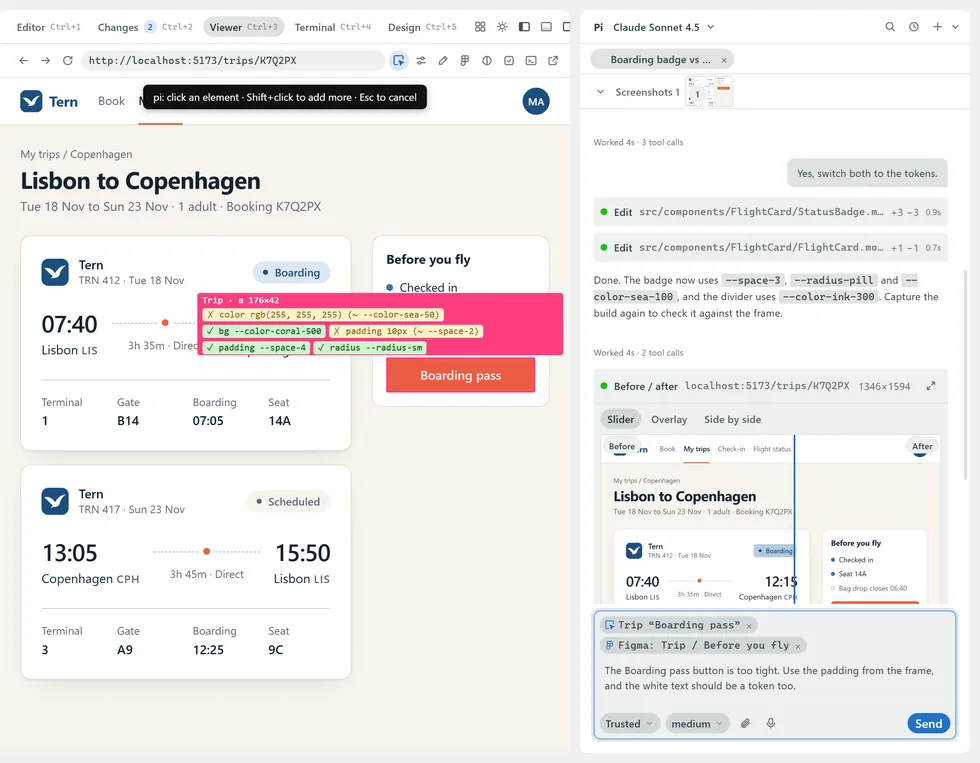
The request, built from a picked element and a Figma frame, waiting in the composer until I send it. -
2.5Make trying cheap
Agents are fast, so the question that matters is how fast I can undo them. Every message I send first snapshots the working files, in git refs that leave my index, HEAD and branches alone, and rewind restores the code, the conversation or both. Every turn that edits files gets a before and after capture of the running app. A chat can also work in its own git worktree, so an experiment never touches my checkout.
A separate Design view hides the editor and the terminal, so reviewing a change doesn't mean reading code first.
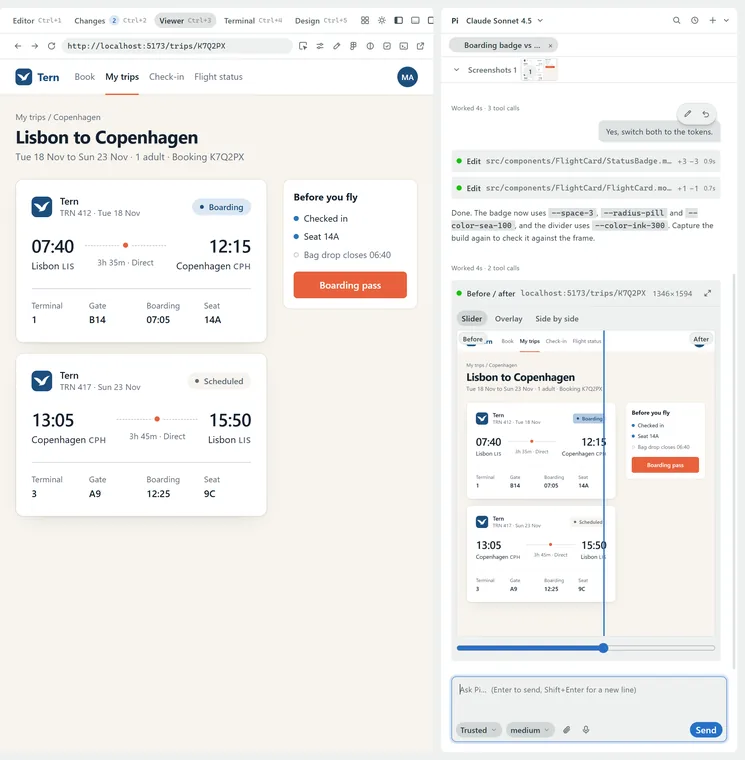
Before and after capture of an edit, with Rewind on the message that caused it.


Who does what
The split is deliberate. Judgement stays with the designer, measuring goes to plain code, and the agent does the part it is good at: finding the right file and writing the change.
- DesignerPicks the Figma frame and the element to check.
- AppCaptures the build at the frame's size and measures it: pixel diff, token check, viewports in light and dark.
- DesignerDecides what is wrong and what it should be, with sliders that snap to tokens.
- AgentFinds the component and its source file, and makes the change in code with the tokens the request names.
- AppCaptures the app before and after the turn, and keeps a checkpoint to rewind to.
- DesignerReviews the result. Keeps it, rewinds, or asks again.
- AgentOpens the pull request in the repo's own conventions, when asked.
Where it stands
Pi Crust is at v0.1.0. I built it for my own work and use it every day. Colleagues on my design team now use it too, and it is about to roll out to more teams. It runs on macOS and Windows 11, and the code is public on GitHub.
It has rough edges. The Windows installer isn't signed yet, the Figma features need Figma desktop with its MCP server switched on, and the Mendix runner doesn't work on Windows yet.
It is built with Electron, Monaco, xterm.js and whisper.cpp. The layout and a few ideas came from Pi Desktop, an earlier app for Pi; no code was copied.